Advanced security policies
Enable advanced security policies to detect and block suspicious scripts and unknown programs that use advanced infection techniques on Windows computers.
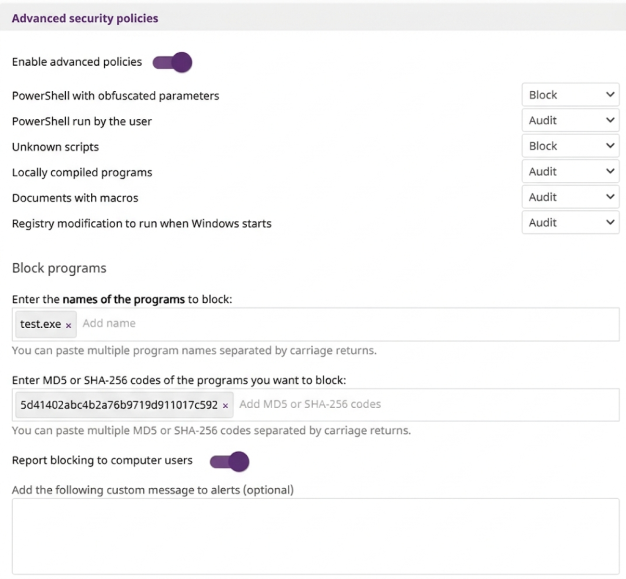
To configure advanced security policies settings:
-
Select Advanced security policies to expand the panel.
-
Select the Enable advanced policies toggle to enable them.
-
For more information about the type of protection provided by each policy, see Types of advanced policies.
-
From the drop-down menus, select the action Advanced EDR must take for each policy type:
-
To block programs, see Blocking suspicious programs.
Types of advanced policies
| Field | Description |
|---|---|
|
PowerShell with obfuscated parameters |
Detects whether the PowerShell interpreter received suspicious parameters that could result in the execution of dangerous operations on the protected computer. This option requires that you enable the anti-exploit protection. |
|
PowerShell run by the user |
Detects attempts to run a monitored PowerShell script by an interactive account capable of executing dangerous operations on the protected computer. This option requires that you enable the anti-exploit protection. |
|
Unknown scripts |
Detects attempts to run a script that the Cytomic security intelligence team has not classified. This policy helps:
If an unknown script should be allowed, you could exclude the file from scans. See Files and paths excluded from scans. |
|
Locally compiled programs |
Detects attempts to run a program that is unknown to the Cytomic security intelligence team because it was compiled on the user computer.. |
|
Documents with macros |
Detects attempts to open Microsoft Office documents with macros that could execute dangerous operations. |
|
Registry modification to run when Windows starts |
Detects the number of times a program tried to add a Windows registry key to gain persistence on the computer and to load with the operating system on every system start. |
Blocking suspicious programs
To increase the security of Windows computers on the network, you can prevent the use of programs you consider dangerous or suspicious:
-
Programs which, due to the way they run, use too much bandwidth or establish too many connection.
-
Programs that enable users to access contents that might contain security threats.
-
Programs that enable users to access contents not related to company activity and which might affect user performance.
To block programs:
-
In the Enter the names of the programs to block text box, enter the names of the files you want to block. You can paste a list of file names separated by line breaks.
-
In the Enter MD5 or SHA-256 codes for the programs you want to block text box, enter the MD5 or SHA-256 codes of the files you want to block. You can paste a list of codes separated by line breaks.
-
To Notify computer users about blocked applications, enable the toggle.
-
In the Add the following custom message to alerts (optional) text box, enter a custom message to show users when Advanced EDR blocks a program.