Managing threats, items in the process of classification, and quarantine
Advanced EDR provides a balance between the effectiveness of the security service and the impact on the daily activities of protected users. This balance is achieved through tools that enable you to manage the way detected items are blocked from executing:
-
Programs classified as malware.
-
Programs classified as PUPs.
-
Programs classified as exploits.
-
Programs classified as viruses.
-
Unknown programs in the process of classification.
-
Network attacks.
For more information about how to allow the execution of unknown programs in the process of classification, see Authorized software settings.
For more information about the Hardening and Lock modes of the advanced protection, see Advanced protection.
Introduction to threat management tools
Network administrators can change the behavior of Advanced EDR with regard to found threats and unknown files in the process of classification using the following tools:
-
Unblock/stop allowing the execution of unknown processes.
-
Delete unknown processes from lists.
-
Allow/stop allowing the execution of programs classified as malware, PUPs, viruses, or exploits.
-
Do not detect again/stop allowing network attacks.
-
Change the Advanced EDR reclassification policy.
-
Manage the backup/quarantine area.
Unblock/stop allowing the execution of unknown processes
Advanced EDR automatically analyzes and classifies all unknown processes in the cloud within the first 24 hours after they are first seen on a workstation or server. This process issues an unambiguous classification (goodware or malware), which is shared with all Cytomic customers so that they can all benefit from the accumulated knowledge.
To strengthen the security of the computers on the network, Advanced EDR provides the Hardening and Lock modes in the advanced protection settings. In both modes, Advanced EDR blocks the execution of processes during the time it takes to classify them, thereby preventing potential risks. This prevents users from running blocked processes until the classification process is completed. The classification process can be performed in two different ways:
-
Automated analysis: Accounts for most cases and takes place in real time.
-
Manual analysis: If the automated analysis cannot return a classification of the unknown process with 99.999% certainty, the sample is manually analyzed by a malware expert. When that happens, the analysis might take a short time.
In circumstances where classification is not immediate, the administrator may decide to take a certain risk and allow the execution of the item. Advanced EDR provides two strategies for doing this:
-
Reactive unblocking: The administrator allows the execution of an unknown item in the process of classification after the user has tried to use it and Advanced EDR has detected and blocked it. See Allowing and preventing items to run for more information.
-
Proactive unblocking: Occurs when the administrator wants to make sure, in advance, that a specific set of programs will not be blocked if they are unknown to Advanced EDR . The aim of this strategy is to prevent any potential negative impact on user performance. See Authorized software settings for more information.
Allow/stop allowing the execution of malware, PUPs, or exploits
Administrators can allow the execution of software that implements features valued by users but which has been classified as a threat. This is the case of PUPs, for example. These are often toolbars which provide search capabilities but also collect users’ private data and confidential corporate information for advertising purposes. See Allowing and preventing items to run for more information.
Do not detect again/stop allowing network attacks
When Advanced EDR detects traffic behavior suspected of being a network attack, the Network Attack Protection module prevents this traffic from reaching the user computer. If you believe that this traffic does not pose a threat to the network, you can prevent this blocking action by creating an exclusion. These exclusions are configured based on the type of technology used in the attack and the source IP address.
Change the reclassification policy
After the administrator unblocks an unknown item previously blocked by Advanced EDR, the classification process will, after some time, catalog the item as malware or goodware. If it is goodware, there are no additional considerations to be made, as Advanced EDR will continue to allow the item to run. However, if it is malware, the reclassification policy is applied, which enables the administrator to define the behavior of Advanced EDR. See Reclassification policy for more information.
Manage the backup/quarantine area
Administrators can retrieve items considered threats and therefore deleted from users’ computers.
Behavior of the security software
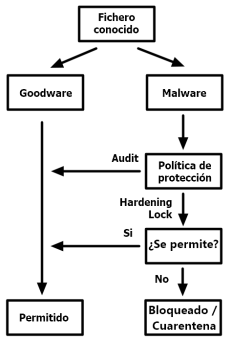
Known files
If a file is classified as malware/PUP/exploit and an advanced protection policy other than Audit is applied, the file is blocked unless the administrator allows it to run.
Unknown files
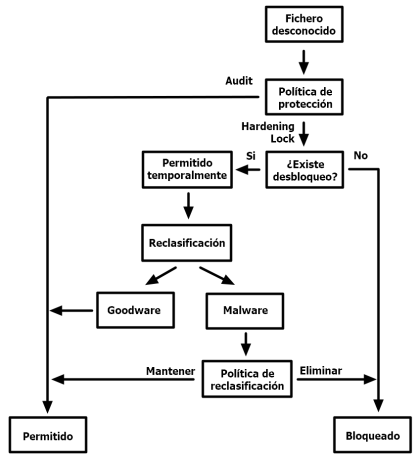
With unknown files in the process of classification and an advanced protection policy other than Audit,Advanced EDRbehaves as follows:
-
If the administrator has not configured the unblocking of the files, they are blocked.
-
If, after classification, the files are goodware, they are allowed to run.
-
If, after classification, the files are malware, they are prevented from running.
-
-
If the administrator has configured the unblocking of the files, they are allowed to run while the classification process completes. After the process is completed:
-
If the file is goodware, it continues to be allowed to run.
-
If the file is malware, it is allowed or prevented from running based on the reclassification policy set by the administrator. See Reclassification policy for more information.
-