Anti-exploit protection and vulnerable driver detection
Anti-exploit technology is not available on Windows ARM systems.
Anti-exploit protection detects attempts to inject malicious code into vulnerable processes run by users.
Advanced EDR neutralizes these attempts based on the exploit detected:
-
Exploit blocking: Advanced EDR detects the injection attempt while it is still in progress. Because the injection process does not complete, the targeted process is not compromised and there is no risk to the computer. The exploit is neutralized without the need to end the affected process or restart the computer. There are no data leaks from the affected process.
-
Exploit detection: Advanced EDR detects the injection after it takes place. Advanced EDR reports that the computer is at risk and the process must be ended as soon as possible. Advanced EDR can either end a compromised process automatically or prompt the user to end the process manually. This enables the user to save work or critical information before the compromised process stops, or the computer restarts. If it is not possible to end a compromised process, the user is prompted to restart the computer.
-
Vulnerable driver blocking: Anti-exploit protection blocks the use of vulnerable drivers, except when the driver loads at operating system startup.
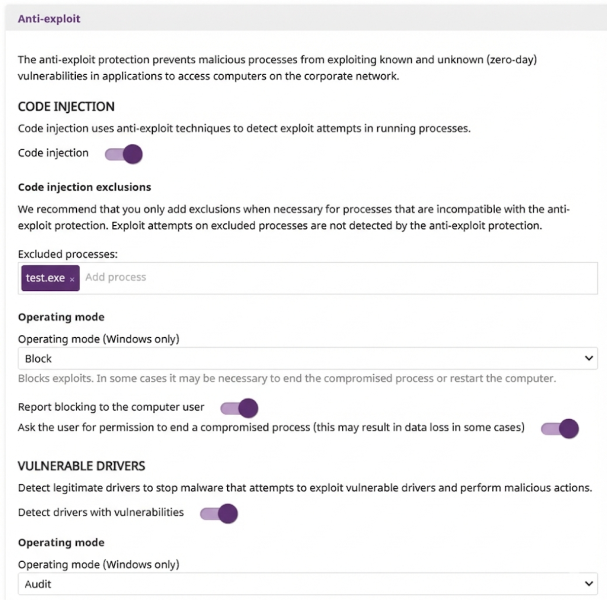
To configure anti-exploit protection:
-
Select Anti-exploit to expand the panel.
-
Enable the Code injection toggle.
-
To exclude processes that are not compatible with anti-exploit protection, in the Excluded processes text box, type the names of the processes and press Enter.
-
By default, you cannot edit or delete the settings assigned by your service provider. If the service provider configured scan exclusions to be editable, the setting profile shows the label Editable exclusions. You can add exclusions, but you cannot delete or edit the list of exclusions defined by the service provider. If your service provider changes the status of the settings from editable to non-editable, the exclusions you added no longer apply. Only the exclusions from the service provider apply. If the service provider changes the configuration again to be editable, then the exclusions you previously added are restored and applied.
-
Select an Operating mode from the list (Windows computers only):
-
To notify users when anti-exploit protection blocks a compromised process, enable the Report blocking to the computer user toggle.
-
To prompt users to end a compromised process, enable the Ask the user for permission to end a compromised process toggle. If the toggle is not enabled, Advanced EDR automatically ends the process. Every time a compromised computer needs to restart, the user must provide confirmation, regardless of whether the toggle is enabled.
-
To detect vulnerable drivers that could be exploited, enable the Detect drivers with vulnerabilities toggle. If the driver detected is part of the Windows boot process, it is not blocked.
-
Select an Operating mode from the list (Windows computers only):
-
Audit: Reports vulnerable drivers in the web console, but does not take action against them or display information to the user.
-
Block: Blocks vulnerable drivers from loading and shows an alert on the affected computer.
-