Analyze Investigation Telemetry with Natural Language
Cytomic Orion provides an AI-powered assistant (GenAI Assistant) that enables you to query the investigation telemetry with natural language. The GenAI Assistant uses a Large Language Model (LLM) that translates your questions into SQL statements and runs them to show the results in table format.
Each account is limited to 100 queries per month. The console shows the number of queries sent. When you approach the monthly limit of allowed queries, a notification appears. The counter resets to 0 on the 1st of each month.
To use the GenAI Assistant, your user account must have the Ask GenAI Assistant permission assigned. See Client Visibility Settings.
For each session, the GenAI Assistant stores associated context from the current query for the next query. This context includes, at a minimum:
-
The entities of interest associated with the investigation: The GenAI Assistant also resolves queries about entities unrelated to the current incident or from a different time period.
-
The last 10 queries: For each query you send, the GenAI Assistant adds the last 10 queries, the SQL statements and results for each of the previous 10 queries, and the top 10 results provided based on operator feedback.
The context information shared is not used to train the LLM nor is it stored in its infrastructure.
The GenAI Assistant implements guardrails that prevent it from generating responses outside its intended purpose:
-
Each query can be up to 500 characters long.
-
To prevent SQL injection in the query, the GenAI Assistant filters keywords such as password, credential, token, api key, system configuration, insert, update, delete, drop, alter, create, and truncate.
-
By default, query results only show data for +/- 7 days from the date of the selected investigation. If you request data outside of this timeframe, query results only show information within the +/- 7 days.
-
The query results do not include more than 100 rows.
-
The query results do not include more than 10 columns.
-
The generated SQL statement cannot contain more than 1,000 characters.
-
If, as part of a response, the GenAI Assistant shows a command line, it shows only the first 100 characters.
-
Explanations for the generated SQL statements are limited to 2,048 characters.
When providing a response, the GenAI Assistant indicates whether it has applied any of these restrictions.
Analyze an Investigation with the GenAI Assistant
-
In the top menu, select Investigations. A list opens and shows all investigations.
-
Select an investigation. A page opens and shows the investigation information, incidents, and signals.
-
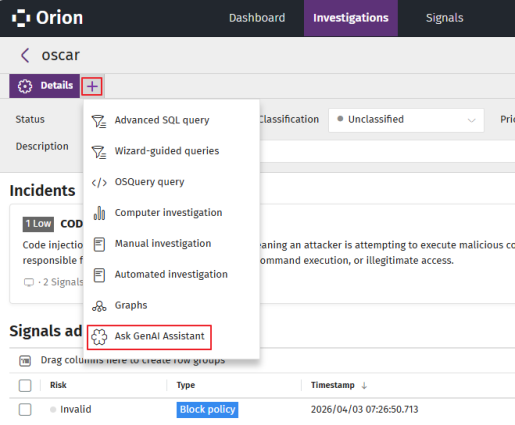
In the tab bar, click
. A context menu opens.
-
Select Ask GenAI Assistant. The Connecting to the GenAI Assistant page opens.
-
-
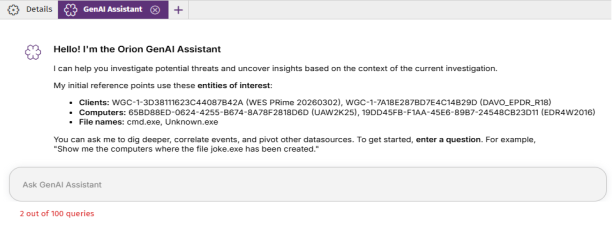
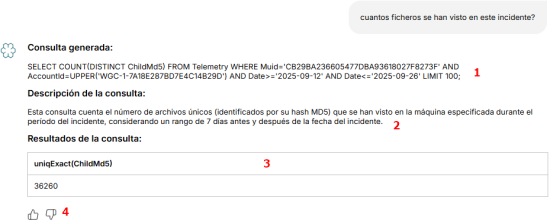
In the Ask the GenAI Assistant text box (1), type a query in natural language. Press Enter. The LLM-powered assistant processes the query for a few seconds and provides a response:
-
Generated query (1): SQL statement equivalent to the query you typed.
-
Query description (2): Description of the query response.
-
Query results (3): Table with the found data.
-
Query rating (4): Like
 or dislike
  the response. This will help us improve the results.
 -
-
Natural Language Queries to SQL Query - Examples
If your results contain more than 100 records, you can copy the generated SQL statement, remove "LIMIT 100" from it, and enter the query in the Advanced SQL Query Tool. See Advanced SQL Query Module.
Retrieve the Users Who Ran a Command Line in the Context of the Investigation
-
Query: Which users have executed the following commandline: 'example.exe x -y -ppanda testfiles.rar'?
-
Response: SELECT DISTINCT LoggedUser FROM Telemetry WHERE CommandLine='example.exe x -y -ppanda testfiles.rar' LIMIT 100
Retrieve the Computers Where a Specific File Was Created in the Context of the Investigation
-
Query: Show me the computers where the file joke.exe has been created.
-
Response: SELECT DISTINCT Muid FROM Telemetry WHERE ChildFilename='joke.exe' AND EventType=1 AND Operation=1 LIMIT 100
Retrieve How Many Computers Are Trying to Access a Specific Computer in the Context of the Investigation
-
Query: How many computers are trying to access the computer with ID 'AGH45MMZSERAGH45MMZS'?
-
Response: SELECT COUNT(DISTINCT RemoteMachineName) FROM Telemetry WHERE Muid='AGH45MMZSERAGH45MMZS' LIMIT 100