Review the Activity Log
Cytomic Orion logs the actions you take in investigations, their type, and their origin. This information enables you to audit the impact of analyst activities on the security of assets.
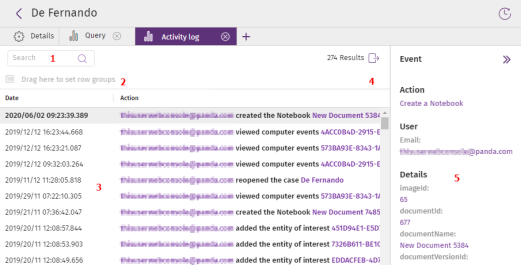
To view the activity log for an investigation:
-
In the upper-right corner of the page, click the
icon (Activity log). A page opens and shows the list of actions that analysts took in the investigation.
-
To change the list view, see List Configuration Tools.
-
To filter the list, in the Search text box, start to type the content of a column. The list shows the rows that partially match the text you typed.
-
To export the content of the list, click the
icon (9). A CSV file downloads to your computer.
-
Click a row. A side panel appears and shows details of the activity.
-
For more information about the fields in the list, see Meaning of List Fields.
Meaning of List Fields
| Field | Description |
|---|---|
|
Action |
Logged action along with the user account that took it and additional information. See Actions Logged in Cytomic Orion. |
|
Date |
Date when the action action was logged. |
|
Action type |
Type of logged action. |
|
User |
Name of the account that took the action. |
Actions Logged in Cytomic Orion
| Action | Description |
|---|---|
|
Update a notebook |
The console user worked on an investigation by editing a notebook. |
|
Add entities of interest |
The console user added an entity of interest to an investigation. |
|
Add or delete clients from an investigation |
The console user changed the client-type entities of interest assigned to an investigation. |
|
Add signals to an investigation |
The console user assigned a signal to an existing investigation. |
|
Assign an investigation to a user |
The console user changed the user assigned to an investigation. |
|
Rename a notebook |
The console user changed the name of a notebook. |
|
Change an investigation classification |
The console user changed the classification of an investigation. |
|
Change an investigation priority |
The console user changed the priority of an investigation. |
|
Cancel a query |
The console user stopped the execution of an SQL query. |
|
Close an investigation |
The console user closed an investigation. |
|
Convert notebook to PDF |
The console user generated a PDF report from the results of a notebook. |
|
Create a notebook |
The console user started an investigation by creating a notebook. |
|
Create an investigation |
The console user assigned one or more signals to a new investigation. |
|
Run a notebook |
The console user ran a notebook to get the results of an investigation. |
|
Delete entities of interest |
The console user removed an entity of interest from an investigation. |
|
Delete a notebook |
The console user deleted a notebook. |
|
Query error |
The execution of an SQL query completed with errors. |
|
Query statistics |
Shows data about the executed SQL query (full SQL statement, number of bytes read, etc.). You can use this field to determine the Cytomic Orion data usage. |
|
Start remote access to a computer |
Cytomic Orion retrieved, from the platform, the credentials the analyst who requested remote access to the investigated computer needs to access it and use the remediation tools. To view a list of the commands run by the analyst, in the side panel (5), find the sessionId attribute and click its content. The Remote session details page opens. See Remote Session Details. |
|
Attempt to start remote access to a computer |
Cytomic Orion tried to retrieve, from the platform, the credentials required to remotely access the investigated computer, but the process failed. |
|
Investigate file |
The console user opened an investigation from the MD5 of a file. |
|
Investigate computer |
The console user opened an investigation from the MUID of a client’s computer. |
|
Investigate computer |
The console user opened an investigation from the name of a client’s computer. |
|
Run a query |
The console user ran an SQL query. |
|
Remove signals from an investigation |
The console user removed signals from an investigation. |
|
Reopen an investigation |
The console user reassigned the In progress or Pending status to a signal assigned to an investigation. |
|
Rename an investigation |
The console user changed the name of an investigation. |
|
Query result |
An SQL query was completed. |
|
Unassign an investigation |
The console user removed the user assigned to an investigation. |
|
Request to isolate computers |
The console user started the process to isolate a computer. |
|
Request to stop isolating computers |
The console user started the process to deisolate a computer. |
|
Request to restart computers |
The console user started the process to remotely restart a computer. |
|
View a notebook |
The console user opened a notebook to view it. |
Remote Session Details
| Field | Description |
|---|---|
|
Session ID |
Session ID assigned by Cytomic Orion. |
|
Date |
Date when the remote connection started. |
|
IP address |
IP address of the accessed computer. |
|
Category |
|
|
Action |
Action taken on the remote computer and logged by Cytomic Orion. |