Cytomic Patch module lists
To see the Cytomic Patch module lists:
-
From the top menu, select Status.
-
From the side menu, click Add. A dialog box opens that shows all available lists.
-
In the Patch management section, select a list.
To see the filtered lists:
-
From the top menu, select Status.
-
From the side menu, select Cytomic Patch. The dashboard with the widgets appears.
-
Click an item in a widget. The list associated with the data filter opens.
To install, uninstall, or exclude patches from the Available Patches, Available Patches by Computers, Installation History, End-of-Life Programs, Excluded Patches, Patch Installation/Uninstallation Task Results, and View Installed/Uninstalled Patches lists, your user account must have the Install, uninstall, and exclude patches permission assigned to its role.
To access the Available Patches, Available Patches by Computers, Installation History, End-of-Life Programs, Excluded Patches, Patch Installation/Uninstallation Task Results, and View Installed/Uninstalled Patches lists, your user account must have the View available patches permission assigned to its role.
For more information about the permissions system, see Managing roles and permissions.
Patch management status
This list shows details of all computers on the network compatible with Cytomic Patch.
| Field | Comment | Values |
|---|---|---|
|
Computer |
Computer name. |
Character string |
|
Computer status |
Agent reinstallation:
Protection reinstallation:
Computer isolation status:
“RDP attack containment” mode:
Patch installation
|
Icon |
|
Folder in the Advanced EPDR folder tree that the computer belongs to. |
Character string |
|
|
Patch management |
Module status. |
|
|
Last checked |
Date when Cytomic Patch last queried the cloud to check whether new patches had been published. |
Date |
|
Last connection |
Date when the Advanced EPDR status was last sent to the Cytomic cloud. |
Date |
 Reinstalling the agent.
 Agent reinstallation error.
 Pending restart.
 Computer in the process of being isolated.
 Isolated computer.
 Computer in the process of stopping being isolated.
 Computer in “RDP attack containment” mode.
 Do not install patches
 Designate as test computers and install patches
 Enabled
 Disabled
 Installation error (failure reason)
 No license
 No information
Fields displayed in the exported file
| Field | Comment | Values |
|---|---|---|
|
Client |
Customer account the service belongs to. |
Character string |
|
Computer type |
Type of device. |
|
|
Computer |
Computer name. |
Character string |
|
The computer primary IP address. |
Character string |
|
|
Domain the computer belongs to. |
Character string |
|
|
Description |
|
Character string |
|
Group |
Folder in the Advanced EPDR folder tree that the computer belongs to. |
Character string |
|
Agent version |
|
Character string |
|
Installation date |
Date when the Cytomic Patch module was successfully installed on the computer. |
Date |
|
Last connection date |
Date when the agent last connected to the Cytomic cloud. |
Date |
|
Platform |
Operating system installed on the computer. |
|
|
Operating system |
Operating system installed on the computer, internal version, and patch status. |
Character string |
|
Updated protection |
Indicates whether the protection module installed on the computer is updated to the latest version or not. |
Boolean |
|
Protection version |
Internal version of the protection module. |
Character string |
|
Last update on |
Date the signature file was last updated. |
Date |
|
Patch management status. |
Module status. |
|
|
Pending restart |
The computer requires a reboot to finish installing or uninstalling one or more downloaded patches. |
Boolean |
|
Patch installation |
Action taken by Cytomic Patch with respect to the computer:
|
Enumeration |
|
Last checked |
Date when Cytomic Patch last queried the cloud to check whether new patches had been published. |
Date |
|
Isolation status |
Indicates whether the computer is isolated or can communicate normally with other computers on the network. |
|
|
Installation error date |
Date and time of the unsuccessful attempt to install Cytomic Patch. |
Date |
|
Installation error |
Reason for the installation error. |
|
Filter tool
| Field | Comment | Values |
|---|---|---|
|
Platform |
Operating system installed on the computer. |
|
|
Computer type |
Type of device. |
|
|
Last checked |
Date when Cytomic Patch last queried the cloud to check whether new patches had been published. |
|
|
Last connection |
Date when the agent last connected to the Cytomic cloud. |
Date |
|
Pending restart to complete patch installation or uninstallation |
The computer requires a reboot to finish installing or uninstalling one or more patches. |
Boolean |
|
Patch installation |
Action taken by Cytomic Patch with respect to the computer:
|
Enumeration |
|
Patch management status. |
Module status. |
|
Computer Details page
Click a row in the list to open the computer details page. For more information, see Computer details.
Available patches
To install, uninstall, and exclude patches from the list, the user account used to access the web console must have the Install, uninstall, and exclude patches permission assigned to its role.
To see the list with read-only permissions, the user account used to access the web console must have the View available patches permission assigned to its role.
For more information about the permissions system, see Managing roles and permissions.
This list shows available patches and their installation status. Each line in the list corresponds to a patch-computer combination.
| Field | Comment | Values |
|---|---|---|
|
Computer |
Name of the computer with outdated software and patch installation option assigned to the computer in the Cytomic Patch settings:
|
Character string |
|
Group |
Folder in the Advanced EPDR folder tree that the computer belongs to. |
Character string |
|
Program |
Name of the out-of-date program or operating system version with missing patches. |
Character string |
|
Patch installation |
Action taken by Cytomic Patch with respect to the computer:
|
Enumeration |
|
Version |
Version number of the outdated program. |
Numeric value |
|
Patch |
Name of the patch or update and additional information (release date, Knowledge Base number, etc.). |
Character string |
|
Release date |
Date and time when the patch was released for download and application. |
Date |
|
Criticality |
Update severity rating and type. |
|
|
Installation |
Indicates the patch installation status:
|
Enumeration |
|
Context menu |
Shows an action menu:
|
Enumeration |
Fields displayed in the exported file
Use the context menu to export the data. The export file can include all data in the list of available patches or a smaller version that shows the trend of the number of available patches in the last 7 days, the last month, or the last year.
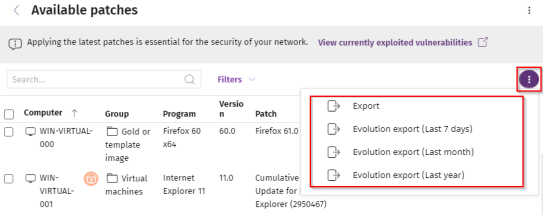
General list export fields
| Field | Comment | Values |
|---|---|---|
|
Client |
Customer account the service belongs to. |
Character string |
|
Computer type |
Type of device. |
|
|
Computer |
Name of the computer with outdated software. |
Character string |
|
IP address |
The computer primary IP address. |
Character string |
|
Domain |
Domain the computer belongs to. |
Character string |
|
Description |
|
Character string |
|
Operating system |
Operating system installed on the computer, internal version, and patch status. |
Character string |
|
Platform |
Operating system installed on the computer. |
|
|
Group |
Folder in the Advanced EPDR folder tree that the computer belongs to. |
Character string |
|
Patch installation |
Action taken by Cytomic Patch with respect to the computer:
|
Enumeration |
|
Vendor |
The company that created the outdated program. |
Character string |
|
Product family |
Name of the product with patches available for installation or a reboot. |
Character string |
|
Program version |
Version number of the outdated program. |
Numeric value |
|
Program |
Name of the outdated program or operating system version with missing patches. |
Character string |
|
Version |
Version number of the outdated program. |
Numeric value |
|
Patch |
Name of the patch or update and additional information (release date, Knowledge Base number, etc.). |
Character string |
|
Criticality |
Update severity rating and type. |
|
|
CVEs (Common Vulnerabilities and Exposures) |
CVE (Common Vulnerabilities and Exposures) ID that describes the vulnerability associated with the patch. |
Character string |
|
KB ID |
ID of the Microsoft Knowledge Base article that describes the vulnerability fixed by the patch and the patch requirements (if any). |
Character string |
|
Release date |
Date and time when the patch was released for download and application. |
Date |
|
Last seen |
Date and time when the computer was last discovered. |
Date |
|
Is downloadable |
Indicates whether the patch is available for download or requires an additional support contract with the software vendor to access it. |
Boolean |
|
Download size (KB) |
Patch size in compressed format. Applying the patch or update might require more space on the target computer storage media than indicated in this field. |
Numeric value |
|
Installation status |
Indicates the patch installation status:
|
Enumeration |
|
File name |
Name of the file that contains the patch. |
Character string |
|
Download URL |
HTTP resource in the software vendor infrastructure to download the patch. |
Character string |
List export fields
| Field | Comment | Values |
|---|---|---|
|
Client |
Customer account the service belongs to. |
Character string |
|
Computer type |
Type of device. |
|
|
Computer |
Name of the computer with outdated software. |
Character string |
|
IP address |
The computer primary IP address. |
Character string |
|
Domain |
Domain the computer belongs to. |
Character string |
|
Description |
|
Character string |
|
Operating system |
Operating system installed on the computer, internal version, and patch status. |
Character string |
|
Group |
Folder in the Advanced EPDR folder tree that the computer belongs to. |
Character string |
|
Patch type |
Type of patch. |
|
|
Date |
|
Numeric value |
Filter tool
| Field | Comment | Values |
|---|---|---|
|
Search |
Computer name. |
Character string |
|
Platform |
Operating system installed on the computer. |
|
|
Patch release |
Date when the patch was released and made available for download. |
|
|
Computer type |
Type of device. |
|
|
Patch type |
Type of patch. |
|
|
Computer |
Name of the computer with outdated software. |
Character string |
|
Program |
Name of the outdated program or operating system version with missing patches. |
Character string |
|
Patch |
Name of the patch or update and additional information (release date, Knowledge Base number, etc.). |
Character string |
|
Program, family, or vendor |
The search applies to the selected program, product family, or company. |
Character string |
|
Patch installation |
Action taken by Cytomic Patch with respect to the computer:
|
|
|
Criticality |
Indicates the update severity rating and type. |
|
|
Installation |
Shows patches that are in the process of installation, filtering them by the installation stage they are in. |
|
|
Show non-downloadable patches |
Shows patches that cannot be directly downloaded by Cytomic Patch because there are additional requirements set by the vendor (EULA acceptance, login credentials, captcha, etc.). |
Boolean |
|
CVE |
CVE (Common Vulnerabilities and Exposures) ID that describes the vulnerability associated with the patch. |
Character string |
Detected Patch page
To view details for a patch, see Patch details
Available patches by computers
To install, uninstall, and exclude patches from the list, the user account used to access the web console must have the Install, uninstall, and exclude patches permission assigned to its role.
To see the list with read-only permissions, the user account used to access the web console must have the View available patches permission assigned to its role.
For more information about the permissions system, see Managing roles and permissions.
This list shows available patches and the number of computers each patch is available for.
| Field | Comment | Values |
|---|---|---|
|
Patch |
Name of the patch or update and additional information (release date, Knowledge Base number, etc.). |
Character string |
|
Program |
Name of the outdated program or operating system version with missing patches. |
Character string |
|
Version |
Version number of the outdated program. |
Numeric value |
|
Release date |
Date and time when the patch was released for download and application. |
Date |
|
Criticality |
Update severity rating and type. |
|
|
Computers |
Number of computers the patch is available for. |
Numeric value |
|
Context menu |
View which computers have the patch available: Shows all computers the patch is available for. |
|
Fields displayed in the exported file
Use the context menu to export the data. The export file can include all data in the list of available patches or a smaller version that shows the trend of the number of available patches in the last 7 days, the last month, or the last year.
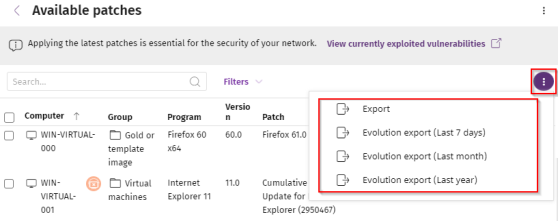
General list export fields
| Field | Comment | Values |
|---|---|---|
|
Vendor |
The company that created the outdated program. |
Character string |
|
Product family |
Name of the product with patches available for installation or a reboot. |
Character string |
|
Program version |
Version number of the outdated program. |
Numeric value |
|
Program |
Name of the out-of-date program or operating system version with missing patches. |
Character string |
|
Version |
Version number of the outdated program. |
Numeric value |
|
Patch |
Name of the patch or update and additional information (release date, Knowledge Base number, etc.). |
Character string |
|
Criticality |
Update severity rating and type. |
|
|
CVEs (Common Vulnerabilities and Exposures) |
CVE (Common Vulnerabilities and Exposures) ID that describes the vulnerability associated with the patch. |
Character string |
|
KB ID |
ID of the Microsoft Knowledge Base article that describes the vulnerability fixed by the patch and the patch requirements (if any). |
Character string |
|
Release date |
Date and time when the patch was released for download and application. |
Date |
|
Computers |
Number of computers the patch is available for. |
Numeric value |
|
Platform |
Operating system installed on the computer. |
|
List export fields
| Field | Comment | Values |
|---|---|---|
|
Client |
Customer account the service belongs to. |
Character string |
|
Computer type |
Type of device. |
|
|
Computer |
Name of the computer with outdated software. |
Character string |
|
IP address |
The computer primary IP address. |
Character string |
|
Domain |
Domain the computer belongs to. |
Character string |
|
Description |
|
Character string |
|
Operating system |
Operating system installed on the computer, internal version, and patch status. |
Character string |
|
Group |
Folder in the Advanced EPDR folder tree that the computer belongs to. |
Character string |
|
Patch type |
Type of patch. |
|
|
Date |
|
Numeric value |
Filter tool
| Field | Comment | Values |
|---|---|---|
|
Search |
Computer name. |
Character string |
|
Platform |
Operating system installed on the computer. |
|
|
Computer type |
Type of device. |
|
|
Patch type |
Type of patch. |
|
|
Program |
Name of the out-of-date program or operating system version with missing patches. |
Character string |
|
Patch |
Name of the patch or update and additional information (release date, Knowledge Base number, etc.). |
Character string |
|
Select a program version, family, or vendor |
The search applies to the selected program, product family, or company. |
Character string |
|
Criticality |
Indicates the update severity rating and type. |
|
|
Show non-downloadable patches |
Shows patches that cannot be directly downloaded by Cytomic Patch because there are additional requirements set by the vendor (EULA acceptance, login credentials, captcha, etc.). |
Boolean |
|
CVE |
CVE (Common Vulnerabilities and Exposures) ID that describes the vulnerability associated with the patch. |
Character string |
Detected Patch page
To view details for a patch, see Patch details
Installation history
To install, uninstall, and exclude patches from the list, the user account used to access the web console must have the Install, uninstall, and exclude patches permission assigned to its role.
To see the list with read-only permissions, the user account used to access the web console must have the View available patches permission assigned to its role.
For more information about the permissions system, see Managing roles and permissions.
This list shows the operations performed by Cytomic Patch on the computers on the network in the specified time period.
| Field | Comment | Values |
|---|---|---|
|
Date |
Date the operation was logged. |
Date |
|
Computer |
Computer name. |
Character string |
|
Group |
Folder in the Advanced EPDR folder tree that the computer belongs to. |
Character string |
|
Program |
Program name or operating system version. |
Character string |
|
Version |
Program or operating system version. |
Character string |
|
Patch |
Name of the patch. |
Character string |
|
Criticality |
Severity rating of the patch. |
|
|
Installation |
Status of the logged operation. |
|
|
Context menu |
Shows a drop-down menu with options. |
|

Fields displayed in the exported file
Use the context menu to export the data. You can download a detailed file that includes all data in the list or a reduced version. In either case, the file contains information about the patches installed in the selected time period.
| Field | Comment | Values |
|---|---|---|
|
Client |
Customer account the service belongs to. |
Character string |
|
Computer type |
Type of device. |
|
|
Computer |
Computer name. |
Character string |
|
IP address |
The computer primary IP address. |
Character string |
|
Domain |
Domain the computer belongs to. |
Character string |
|
Description |
|
Character string |
|
Platform |
Operating system installed on the computer. |
|
|
Group |
Folder in the Advanced EPDR folder tree that the computer belongs to. |
Character string |
|
Date |
Date and time of the logged operation. |
Date |
|
Patch installation |
Action taken by Cytomic Patch with respect to the computer:
|
Enumeration |
|
Program |
Program name or operating system version. |
Character string |
|
Version |
Program or operating system version. |
Character string |
|
Patch |
Name of the installed patch. |
Character string |
|
Criticality |
Severity rating of the patch. |
|
|
CVEs (Common Vulnerabilities and Exposures) |
CVE (Common Vulnerabilities and Exposures) ID that describes the vulnerability associated with the patch. |
Character string |
|
KB ID |
ID of the Microsoft Knowledge Base article that describes the vulnerability fixed by the patch and the patch requirements (if any). |
Character string |
|
Release date |
Date and time when the patch was released for download and application. |
Date |
|
Installation |
Indicates whether the patch is already included in the repository that contains the patches to be applied to computers or must be manually downloaded and added to the patch repository by the administrator. |
|
|
Install errors |
The Cytomic Patch module did not install correctly. |
|
|
Download URL |
URL for downloading the patch individually. |
Character string |
|
Result code |
Operation result code. See the vendor documentation for information about result codes. |
Numeric value |
|
The task name. |
Name of the patch installation task. This column appears only in the extended export. |
Character string |
|
Task launch date |
Date when the Cytomic Patch task associated with the computer was scheduled to run. This column appears only in the extended export. |
Date |
|
Task start date |
Date when the Cytomic Patch task associated with the computer started to run. This column appears only in the extended export. |
Date |
|
Task end date |
Date when the Cytomic Patch task associated with the computer finished to run. This column appears only in the extended export. |
Date |
Filter tool
| Field | Comment | Values |
|---|---|---|
|
Search |
Computer name. |
Character string |
|
Date |
Time period in which the patches were installed.
|
|
|
Platform |
Operating system installed on the computer. |
|
|
Computer type |
Type of device. |
|
|
Computer |
Computer name. |
Character string |
|
Program |
Program name or operating system version. |
Character string |
|
Patch |
Name of the installed patch. |
Character string |
|
Installation Attempts |
Shows all failed patch installation attempts or only the latest attempt. |
|
|
Patch installation |
Action taken by Cytomic Patch with respect to the computer:
|
Enumeration |
|
Criticality |
Severity rating of the patch. |
|
|
Installation |
Status of the logged operation. |
|
|
CVE |
CVE (Common Vulnerabilities and Exposures) ID that describes the vulnerability associated with the patch. |
Character string |
Installed Patch page
To view details for a patch, see Patch details
End-of-Life programs
This list shows programs that are no longer supported by the relevant vendor. These programs are particularly vulnerable to malware and other security threats.
| Field | Comment | Values |
|---|---|---|
|
Computer |
Name of the computer with EOL software. |
Character string |
|
Group |
Folder in the Advanced EPDR folder tree that the computer belongs to. |
Character string |
|
Program |
EOL program name. |
Character string |
|
Version |
EOL program version. |
Character string |
|
EOL |
Date when the program reached its end of life. |
Date (in red if the program reached its end of life) |
Fields displayed in the exported file
| Field | Comment | Values |
|---|---|---|
|
Client |
Customer account the service belongs to. |
Character string |
|
Computer type |
Type of device. |
|
|
Computer |
Computer name. |
Character string |
|
Platform |
Operating system installed on the computer. |
|
|
IP address |
The computer primary IP address. |
Character string |
|
Domain |
Domain the computer belongs to. |
Character string |
|
Description |
|
Character string |
|
Group |
Folder in the Advanced EPDR folder tree that the computer belongs to. |
Character string |
|
Program |
EOL program name. |
Character string |
|
Version |
EOL program version. |
Character string |
|
EOL |
Date when the program reached its end of life. |
Date |
|
Last seen |
Date and time when the computer was last discovered. |
Date |
Filter tool
| Field | Comment | Values |
|---|---|---|
|
Search |
Computer name. |
Character string |
|
Computer type |
Type of device. |
|
|
Platform |
Operating system installed on the computer. |
|
|
End-of-Life date |
Date when the program will reach its EOL. |
|
Program Details page
Click a row in the list. The Program details page opens.
| Field | Comment | Values |
|---|---|---|
|
Program |
Name of the program or operating system version that received the patch. |
Character string |
|
Family |
Bundle, suite, or program group the software belongs to. |
Character string |
|
Publisher/Company |
Company that designed or published the program. |
Character string |
|
Version |
Program version. |
Character string |
|
EOL |
Date when the program reached its end of life. |
Date |
Excluded patches
This list shows patches that you marked as excluded, preventing them from being installed on the computers on the organization network. The list shows a line for each computer-excluded patch pair, except for patches excluded for all computers on the network, for which a single line appears.
| Field | Comment | Values |
|---|---|---|
|
Computer |
The content of this field varies depending on the target of the exclusion:
|
Character string |
|
Group |
Folder in the Advanced EPDR group tree that the computer belongs to. |
Character string |
|
Program |
Name of the program the excluded patch belongs to. |
Character string |
|
Version |
Version of the program the excluded patch belongs to. |
Character string |
|
Patch |
Name of the excluded patch. |
Character string |
|
Criticality |
Severity rating of the patch. |
|
|
Excluded by |
Management console user account who excluded the patch. |
Character string |
|
Excluded since |
Date the patch was excluded. |
Character string |
 If the patch was excluded for a single computer, the field shows the computer name.
 If the patch was excluded for all computers in the account, the text "(All)" is shown.
Fields displayed in the exported file
| Field | Comment | Values |
|---|---|---|
|
Client |
Customer account the service belongs to. |
Character string |
|
Computer type |
Type of device. |
|
|
Computer |
The content of this field varies depending on the target of the exclusion: If the patch was excluded for a single computer, the field shows the computer name. If the patch was excluded for all computers in the account, the text "(All)" is shown. |
Character string |
|
IP address |
The computer primary IP address. |
Character string |
|
Domain |
Domain the computer belongs to. |
Character string |
|
Description |
The computer description assigned by the network administrator. |
Character string |
|
Platform |
Operating system installed on the computer. |
|
|
Group |
Folder in the Advanced EPDR folder tree that the computer belongs to. |
Character string |
|
Patch installation |
Action taken by Cytomic Patch with respect to the computer:
|
Enumeration |
|
Program |
Name of the program the excluded patch belongs to. |
Character string |
|
Version |
Version of the program the excluded patch belongs to. |
Character string |
|
Patch |
Name of the excluded patch. |
Character string |
|
Criticality |
Severity rating of the patch. |
|
|
CVEs (Common Vulnerabilities and Exposures) |
CVE (Common Vulnerabilities and Exposures) ID that describes the vulnerability associated with the patch. |
Character string |
|
KB ID |
ID of the Microsoft Knowledge Base article that describes the vulnerability fixed by the patch and the patch requirements (if any). |
Character string |
|
Release date |
Date and time when the patch was released for download and application. |
Date |
|
Download size (KB) |
Patch size in compressed format. Applying the patch or update might require more space on the target computer storage media than indicated in this field. |
Numeric value |
|
Excluded by |
Management console user account who excluded the patch. |
Character string |
|
Excluded since |
Date the patch was excluded. |
Character string |
Filter tool
| Field | Comment | Values |
|---|---|---|
|
Search |
Computer name. |
Character string |
|
Platform |
Operating system installed on the computer. |
|
|
Computer type |
Type of device. |
|
|
Computer |
Name of the computer for which patches were excluded. |
Character string |
|
Program |
Name of the program the excluded patch belongs to. |
Character string |
|
Patch |
Name of the excluded patch. |
Character string |
|
Patch installation |
Action taken by Cytomic Patch with respect to the computer:
|
Enumeration |
|
Criticality |
Severity rating of the patch. |
|
|
Show non-downloadable patches |
Shows patches that cannot be directly downloaded by Cytomic Patch because there are additional requirements set by the vendor (EULA acceptance, login credentials, captcha, etc.). |
Boolean |
|
CVEs |
CVE (Common Vulnerabilities and Exposures) ID that describes the vulnerability associated with the patch. |
Character string |
Excluded Patch page
To view details for a patch, see Patch details
Click a row in the list. The Excluded patch page opens and shows details of the patch excluded from installation tasks. This data might vary depending on the operating system installed on the computer.
| Field | Comment | Values |
|---|---|---|
|
Patch |
Name of the patch or update and additional information (release date, Knowledge Base number, etc.). |
Character string |
|
Program |
Name of the outdated program or operating system version with missing patches. |
Character string |
|
Criticality |
Indicates the update severity rating and type. |
Service Pack |
|
CVEs |
CVE (Common Vulnerabilities and Exposures) ID that describes the vulnerability associated with the patch. |
Character string |
|
Computer |
Name of the computer with outdated software. |
Character string |
|
Excluded by |
Management console user account who excluded the patch. |
Character string |
|
Excluded since |
Date and time the patch was excluded. |
Numeric value |
|
Release date |
Date and time when the patch was released for download and application. |
Date |
|
KB ID |
ID of the Microsoft Knowledge Base article that describes the vulnerability fixed by the patch and the patch requirements (if any). |
Character string |
|
Description |
Notes provided by the software vendor about the effects of applying the patch, special conditions, and resolved vulnerabilities. |
Character string |
Patch installation/uninstallation task results
This list shows the results of a patch installation or uninstallation task performed on the computers on your network.
-
From the top menu, select Tasks.
-
In the task list, click the View results link under the patch installation task. The Task results page opens.
-
From the drop-down menu, select the task instance for which you want to view the results.
| Field | Description | Values |
|---|---|---|
|
Computer |
Name of the computer the patch was installed/uninstalled from. |
Character string |
|
Group |
Advanced EPDR group the computer belongs to. |
Character string |
|
Patch installation |
Action taken by Cytomic Patch with respect to the computer:
|
Enumeration |
|
Status |
Task status. |
|
|
Patches installed/uninstalled |
Number of patches installed/uninstalled. |
Character string |
|
Start date |
Date the installation task started. |
Date |
|
End date |
Date the installation task ended. |
Date |
Filter tool
| Field | Description | Values |
|---|---|---|
|
Status |
Installation/uninstallation task status. |
|
|
Applied/Uninstalled patches |
Computers on which patches have been installed/uninstalled. See Viewing installed/uninstalled patches. |
|
Viewing installed/uninstalled patches
This list shows the patches installed/uninstalled on your computers, and other additional information:
-
From the top menu, select Tasks.
-
In the task list, click the View results link under the patch installation task. The Task results page opens.
-
From the drop-down menu, select the task instance for which you want to view the results.
-
Click the View installed patches/View uninstalled patches link. A page opens that shows the patches installed/uninstalled in the selected instance.
| Field | Description | Values |
|---|---|---|
|
Computer |
Name of the computer the patch was installed/uninstalled from. |
Character string |
|
Group |
Advanced EPDR group the computer belongs to. |
Character string |
|
Program |
Patched program. |
Character string |
|
Version |
Program version. |
Character string |
|
Patch |
Installed/uninstalled patch. |
Character string |
|
Criticality |
Severity rating of the installed/uninstalled patch. |
|
|
Result |
Indicates whether the task was completed successfully or failed. |
|
|
Date |
Date the task ran. |
Date |
Patch details
Click a row in the list to open a page that shows details of the patch.
The data, fields, and actions available might vary depending on the operating system installed on the device and the list from which the patch details are accessed.
Patch details are divided into these sections:
Overview
| Field | Comment | Values |
|---|---|---|
|
Patch |
Name of the patch or update and additional information (release date, Knowledge Base number, etc.). |
Character string |
|
Program |
Name of the outdated program or operating system version with missing patches. |
Character string |
|
Program version |
Version number of the outdated program. |
Character string |
|
Family |
Name of the product with patches available for installation or a reboot. |
Character string |
|
Vendor |
The company that created the outdated program. |
Character string |
|
Criticality |
Indicates the update severity rating and type. |
|
|
CVEs (Common Vulnerabilities and Exposures) |
CVE (Common Vulnerabilities and Exposures) ID that describes the vulnerability associated with the patch. |
Character string |
|
Computer |
Name of the computer with outdated software. |
Character string |
|
Excluded by (From the Excluded Patches list) |
Management console user account who excluded the patch. |
Character string |
|
Excluded since |
Date and time the patch was excluded. |
Numeric value |
|
Installation status |
Indicates whether the patch is already included in the repository that contains the patches to be applied to computers or must be manually downloaded and added to the patch repository by the administrator. |
|
|
Install patch (From the Available Patches list) |
Click the Install patch button. A dialog box opens for you to select the recipients of the patch installation task:
|
|
|
Uninstall patch (From the Installation History list) |
Click Uninstall patch. A dialog box opens to select the recipients of the patch uninstallation task:
After it is uninstalled, the patch reappears in the list of available patches, and if any installation task includes it, it is reinstalled. To avoid installing a patch, exclude it. See Excluding patches. |
|
|
Stop excluding (From the Excluded Patches list) |
Click Stop excluding. A confirmation dialog box opens. Click Stop excluding. |
|
Patch details
| Field | Comment | Values |
|---|---|---|
|
Release date |
Date and time when the patch was released for download and application. |
Date |
|
Download size |
Patch size in compressed format. Applying the patch or update might require more space on the target computer storage media than indicated in this field. |
Numeric value |
|
KB ID |
ID of the Microsoft Knowledge Base article that describes the vulnerability fixed by the patch and the patch requirements (if any). |
Character string |
|
Download URL |
URL for downloading the patch individually. |
Character string |
|
File name |
Name of the file that contains the patch. |
Character string |
|
Description |
Information about the impact the vulnerability could have on computers. |
Character string |
Patch installation status
This section shows information about patch installation:
-
Number of successful and failed installations. See Sequencing patches.
-
Tasks used to run patch installation. See Configuring a patch download and installation task.
You can use as an installation condition only the data obtained from the devices on your network. WatchGuard customer data is shown for information purposes only and includes data from computers managed in the instance and region where your security product is hosted.
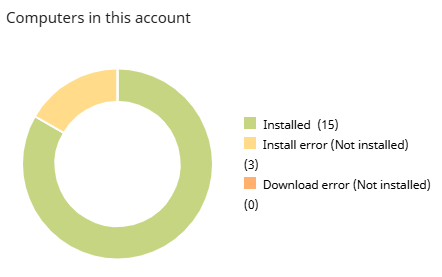
Meaning of the data displayed
| Data | Description |
|---|---|
|
Installed |
Number of successful installations on the network. |
|
Install error (Not installed) |
Number of failed installations on the network. |
|
Download error (Not installed) |
Number of errors downloading patches on the network. |
Lists accessible from the panel
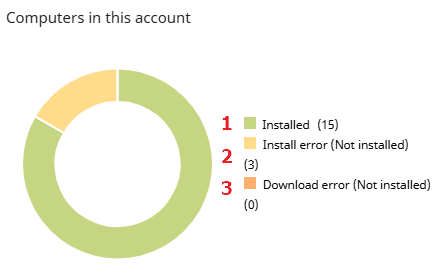
Click the hotspots shown to open the Installation history list filtered by the patch name and the criteria shown below:
| Hotspot | Filter |
|---|---|
|
(1) |
Installation = Installed. |
|
(2) |
Installation = Error. |
|
(3) |
Installation = Download error. |
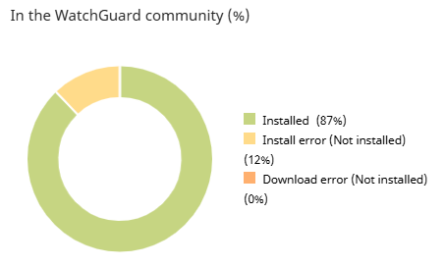
Meaning of the data displayed
| Data | Description |
|---|---|
|
Installed |
Percentage of successful installations on WatchGuard customer devices in the same region as your product. |
|
Install error (Not installed) |
Percentage of failed installations on WatchGuard customer devices in the same region as your product. |
|
Download error (Not installed) |
Percentage of failed downloads on WatchGuard customer devices in the same region as your product. |