Restore Deleted Signals
The recycle bin contains both signals automatically deleted by Cytomic Orion when it applies a deletion rule and signals that you delete manually.
The recycle bin retains deleted signals for one month, after which they are permanently deleted.
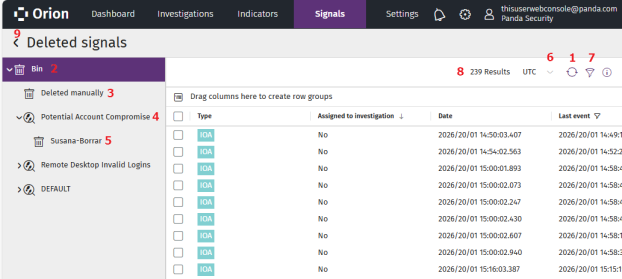
To restore deleted signals from the recycle bin:
-
From the top menu, select Signals. The Signals list opens.
-
Click Go to deleted signals. The Deleted signals list opens.
-
To modify the list view and quickly find signals of your interest, see List Configuration Tools.
-
To change the time interval for the signals in the list:
-
Click the
icon (3). The Signals panel appears.
-
From the drop-down list, select a time interval (Last 24 hours or Last 7 days) for the signals you want to show in the list.
-
To specify a time interval, select Custom. Enter a start date and an end date, and select a time zone.
-
Click Apply. The signal list and counter (4) update automatically.
-
-
For more information about the columns in the list, see Fields in the Signals List.
-
To restore signals that you deleted manually:
-
From the side menu, select Bin
(2). A tree appears that shows the available deletion methods.
-
Select Deleted manually
-
Select the check boxes for the signals you want to restore. A toolbar appears under the top menu.
-
Select Recover signal
. A confirmation dialog box opens.
-
Click Yes. The signal is removed from the Deleted signals list and added to the Signals list.
-
-
To restore signals deleted by an automatic deletion rule:
-
From the side menu, select Bin
-
If the deletion rule has the Hunting rule criterion selected in its configuration, select the name of the hunting rule
 (4) associated with the deletion rule. A list opens that shows all deletion rules created from the hunting rule.
 -
If the deletion rule does not have the Hunting rule criterion selected in its configuration, select DEFAULT (5). A list opens that shows all deletion rules that do not have that criterion selected in their configuration.
-
Select the name of the deletion rule. The list shows all the signals the rule deleted.
-
Select the check boxes for the signals you want to restore. A toolbar appears under the top menu.
-
Select Recover signal
-
Click Yes. The signal is removed from the Deleted signals list and added to the Signals list.
-
-
To permanently delete a signal:
-
From the list, select the check boxes for the signals you want to permanently delete. A toolbar appears under the top menu.
-
Select Delete.
-
Click Yes. The selected signals are deleted. You cannot restore these signals.
-
-
To go back to the Signals list, click the
 icon (9).