Wizard-guided Queries Module
Access the Wizard-guided Queries Module
The Wizard-guided Queries module streamlines the creation of queries through a wizard that removes the need to know the SQL language syntax and speeds up technician analyses.
To access the Wizard-guided queries tab:
-
In the top menu, select Investigations. Select the investigation that contains the signal that you want to investigate, or create a new investigation by clicking the New investigation button in the upper-right corner of the page. For more information, see Create an Investigation.
-
In the tab menu, click the
icon to open the context menu. Select Advanced SQL query. The wizard page opens. This page has the structure described in General Structure of the Query Wizard.
Required Permissions
The user account requires the Access to the query wizard permission to use this resource. The results that analysts get are restricted to the clients visible to their user accounts. See Access, Control, and Monitor the Analysis Console.
General Structure of the Query Wizard
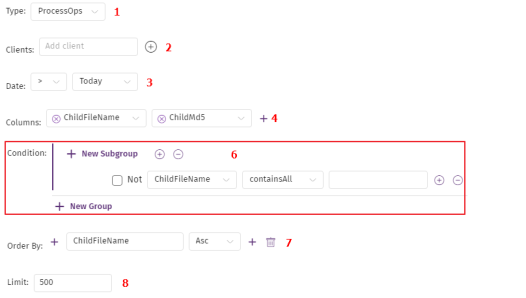
To create a query with the wizard, you must configure these parameter blocks:
-
Type (1): This is the data source against which you want to run the query. The drop-down menu lists the tables shown in Tables (1). It is equivalent to the
FROM [table]clause in SQL. -
Clients (2): Filters data by client. Analysts can filter data only by the clients they have visibility to.
You must specify at least one client in each query.
-
Date (3): Filters data by date. It is equivalent to clause
WHERE Timestamp [comparer] DateTime.-
Choose a comparer: greater than, less than, equal to, greater than or equal to, or less than or equal to.
-
Select the date to compare: Today, Yesterday, or a specific date.
-
-
Columns (4): This is the data you want to retrieve. It is equivalent to the columns in the
SELECT [column1, column2, ...]clause in SQL. -
Condition (6): It is equivalent to the
WHEREclause in SQL. See later for more information about this clause. -
Sort by (7): Results are sorted by the content of the specified fields, in ascending (Asc) or descending (Desc) order. It is equivalent to the
ORDER BY [field1, field2, ...]clause in SQL. If you specify more than one field, results are sorted according to the order of the fields in the block. -
Limit (8): Limits the number of records retrieved by a query. It is equivalent to the
LIMITorTOPclauses in SQL.