Manage Incidents
An incident is a group of related signals that have a high probability of being a cyberattack.
Incidents are dynamic entities. Cytomic Orion can add signals to an incident or group similar incidents up to seven days after the incident is created.
Cytomic Orion automatically adds all incidents detected on a computer to the open investigation it created for that computer. If the computer does not have any open investigations, Cytomic Orion creates a new investigation for the incident. If there already was an investigation, Cytomic Orion adds the Updated label to its name until the user assigned to the investigation accesses its content.
An incident can belong only to one investigation and one computer.
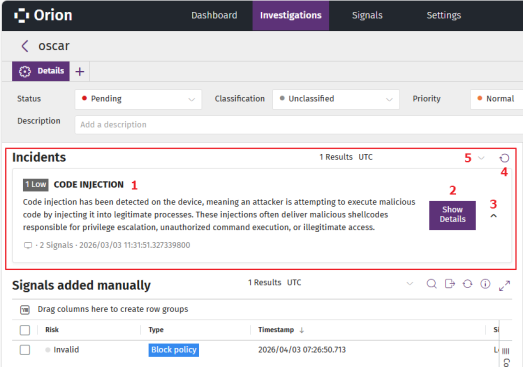
To manage the incidents included in an investigation:
-
From the top menu, select Investigations. A list opens and shows all investigations.
-
To find a specific investigation, see Configure and Filter the Investigations List.
-
Select an investigation. A page opens that shows information about the investigation. The Incidents (1) section shows a list of all incidents included in the investigation.
-
For more information about the fields in the Incidents list, see Incidents List.
-
To view details for an incident, in the Incidents section, click the Show Details button for the incident. The incident details page opens. See Incident Details.
-
To view the signals included in an incident:
-
Click the
 (3) icon for the incident. A list opens and shows the signals included in the incident.
 -
To modify the list view and quickly find signals of your interest, see List Configuration Tools.
-
For more information about the columns in the list, see Fields in the Signals List.
-
-
To refresh the list of incidents, click the
icon (4).
-
To change the time zone for the dates shown, click the
(5) icon and select a time zone from the drop-down list.
Incidents List
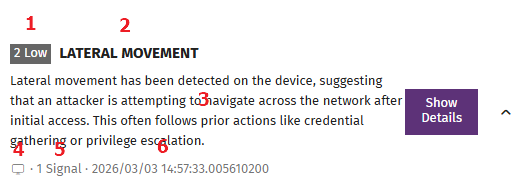
The Incidents section shows a summary of each incident.
| Field | Description |
|---|---|
|
Incident risk (1) |
An incident includes one or more signals, each with a risk level. The incident risk level is the same as the highest risk level of the signals it includes.
|
|
Name (2) |
The name of the incident provided by Cytomic threat hunters, and the status of the incident:
|
|
Description (3) |
The description of the incident provided by Cytomic threat hunters. |
|
Computer (4) |
The name of the computer where the incident was detected. An incident can belong only to one computer. |
|
Number of signals (5) |
The number of signals included in the incident. |
| Date |
Date and time when the incident was created. |